Test Mode

Contents
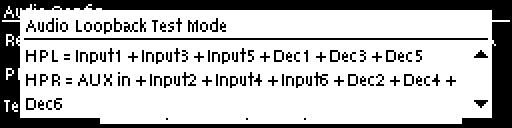
Test mode is used by the codec to perform an input/output loopback test of audio. E.g. Input 1 is routed to Output 1, Input 2 is routed to Output 2 etc.
1.Press the SETTINGS  button.
2.Navigate to Audio and press  .
.
3.Navigate to Test Mode and press
4.Navigate to Info and press to view the Audio Loopback Test Mode summary.
Loopback input/output test mode is enabled while the Audio Loopback Test Mode dialog appears on the screen. When you navigate out of this screen this test mode ceases.