Configuring ISDN Modules

Contents
ISDN settings in the Module menu determine how each codec module operates at a particular site. You can copy similar programs between codecs installed at different locations and also configure site-specific settings for how each ISDN module should connect. ISDN module settings may need to be adjusted depending on your country and network requirements.
1.Open the Java Toolbox web-GUI and click the Settings  symbol at the top of the screen to display the Settings panel.
2.Click the Modules button at the top of the Settings panel to display the settings for Module 1.
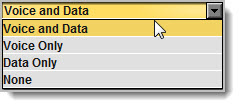
3.Click the drop down arrow for Accept and select whether to allow or disallow circuit switched voice or data calls. The default setting allows Data Only.
|
Important Note: G.711 is the algorithm used when Voice Only is selected. |

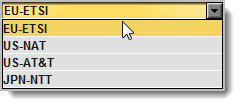
4.Click the drop down arrow for Network and select the Network Type corresponding to the region in which you are using the codec (see ISDN Module Configuration for more details).
5.Click the drop-down arrow for Line Type and select your preferred option. Ask your Telco whether your ISDN line is Point-to-Point or Point-to-Multipoint. By default select Point-to-Multipoint, unless your switch type is an AT&T 5ESS custom point-to-point.
6.If you are in the US enter DN and SPID numbers as required, or in other regions enter DN or MSN numbers as required.
7.Click the Save Settings button at the bottom of the panel when configuration is complete.
|
Important Notes:
Directory Numbers and Multiple Subscriber Numbers Directory Numbers (DN) in North America and Multiple Subscriber Numbers (MSN) in the rest of the world are simply phone numbers associated with an ISDN B channel, like lines listed in a typical phone directory. Your Telco will normally supply 2 DN/MSN numbers for each pair of B channels. However, these numbers may or may not be associated with a specific B channel.
Often broadcasters prefer to predict which B channel will answer an incoming call to ensure audio routing is consistent. However, if a DN or MSN number is not entered in the codec and multiple B channels are available, the codec may use any channel to answer an incoming call. To ensure calls are routed consistently, enter a DN/MSN number (without the country or area code) as the DN/MSN for a B channel, then only that corresponding B channel will answer an incoming call to that number. Programming DN/MSN numbers for each B channel allows the codec to ignore calls without matching DN/MSN numbers. This is the best way to answer calls from codecs in a predictable manner.
SPID Numbers in North America ISDN relies on an initialization procedure for associating Service Profiles with specific terminating equipment (e.g. your audio codec) rather than lines. In the US Telcos assign a Service Profile ID (SPID) number which assists in identifying different ISDN services across the network. Your Telco must provide a SPID for each B channel you order when connecting over US-Nat or US-AT&T networks in the US. A SPID is not required when using the AT&T PTP protocol.
Typically, each ISDN BRI service in the US will have two SPIDs and these must be entered correctly. When you enter a SPID into your codec and connect it to an ISDN line, an initialization and identification process takes place, whereby the terminating equipment (your codec) sends the SPID to the switch. The switch then associates the SPID with a specific Service Profile and directory number.
Note: SPID numbers normally include the phone number and additional prefix or suffix digits up to 20 digits long. |