Enabling Relays & RS232 Data

Contents
Data must be enabled to activate contact closure CONTROL PORT I/O operation and RS232 data. Please see Appendix A for RS232 and Control Port Wiring information.
1.Press the HOME  button to return to the Home screen, then tap Dialer
  .
.
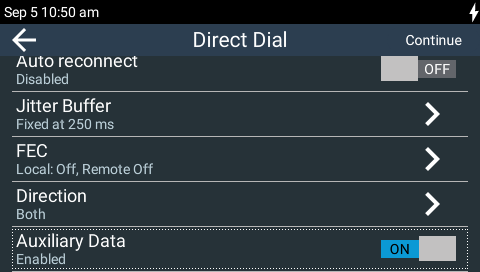
2.Swipe or navigate down and tap the Auxiliary Data On/Off button to toggle between enabling and disabling this feature. Note: default setting is Disabled.
Configuring Control Port Contact Closure Operation
The Rules panel in the Toolbox Java and HTML5 Web-GUIs can be used to configure switch inputs and relay outputs. See Creating Rules to learn about configuring rules using the Java Toolbox Web-GUI, or read Creating Rules for instructions on using the HTML5 Toolbox Web-GUI.
Configuring RS232 Data
When Data is enabled the codec can be connected to external devices and transport RS232 data using the CONTROL PORT I/O on the left side panel of the codec. It is important to configure two settings:
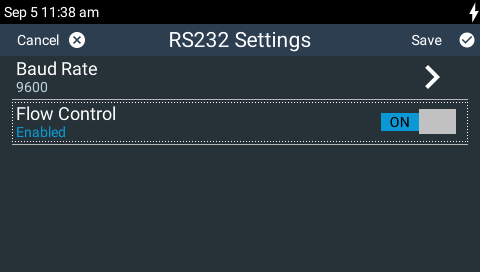
1.Enable serial port flow control within the codec. Flow control regulates the flow of data through the serial port. If disabled, unregulated data will flow and some may be lost.
2.Match the serial port baud rate to the rate used by the device connected to the codec CONTROL PORT I/O. Ideally the settings on both codecs should match, or you could encounter data overflow issues.
To adjust these settings:
1.Press the HOME button to return to the Home screen, then tap Settings  .
.
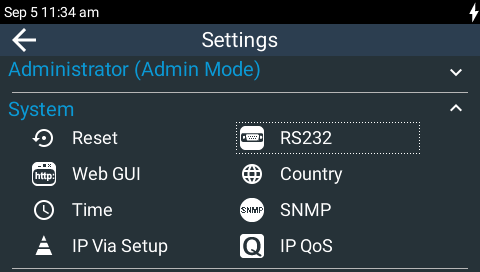
2.Navigate to System and then tap RS232  .
.
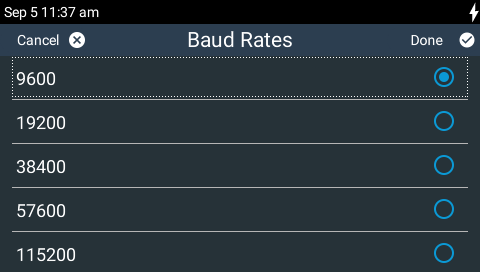
3.Tap Baud Rate to select from the baud rate options.
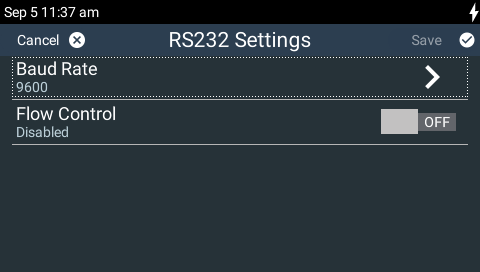
4.Tap the Flow Control On/Off button to toggle between enabling and disabling this feature. Tap Save in the top right-hand corner of the TOUCH SCREEN to confirm the new setting. Note: Flow control is Disabled by default.
|
Important Notes: •When connecting to G3 codecs over IP, ISDN or POTS only in-band data is available via the Music and MusicPLUS algorithms. See RS232 Data Configuration for more details. •Only the dialing codec needs to be configured to send RS232 data to another Tieline G5 codec. Session data sent from the dialing codec configures the answering codec. |
