To download the latest codec firmware visit http://www.tieline.com/Support/Latest-Firmware. Copy the firmware file onto a USB stick and then use the following procedure to perform a firmware upgrade. Note: A single partition FAT32 formatted SD card must be used. To safely remove an SD card after the upgrade, press the HOME  button to return to the Home screen, then tap Settings
  > System > Safe Eject
  .
.
1.Insert an SD card with the latest firmware into the SD card slot on the rear panel of the codec.
2.Press the HOME button to return to the Home screen, then tap Settings .
3.Swipe up and tap to expand the About & Firmware menu, then tap Firmware  .
.

4.Navigate to the firmware file on the SD card, then press the  button.
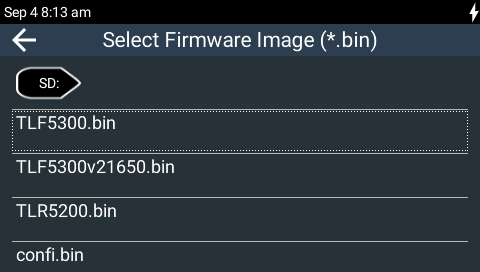
5.Tap to confirm and commence the firmware upgrade.
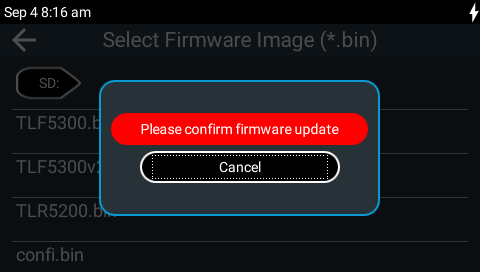
6.Safely remove the SD card from the codec after performing the upgrade. From the Home screen tap Settings > System > Safe Eject .
|
Important Note: We recommend clearing your browser cache after the upgrade is complete when using the HTML5 Toolbox web-browser GUI to control codec functions. The short cuts for this are: •Google Chrome: shift+Ctrl+delete •Mozilla Firefox: Ctrl+shift+delete •Internet Explorer: Ctrl+shift+delete •Safari: Ctrl+alt+e |