Product |
Feature |
Notification |
Gateway 4 |
Control Ports |
One DB-25 connector supporting 8 CMOS solid state relays for the control of equipment, consisting of 8 relay closures and 8 opto-isolated outputs. |
Gateway 8/16 |
Control Ports |
Two DB-25 connectors supporting 16 CMOS solid state relays for the control of equipment, consisting of 16 relay closures and 16 opto-isolated outputs. |
Relays
The Gateway range of codecs uses one or two DB-25 connectors to facilitate the use of CMOS solid state relays for the control of equipment. Operation functions can be configured using the Rules panel in the HTML5 Toolbox Web-GUI.
Inputs
The input signal is referenced to chassis ground, i.e. the ground reference terminal on the connector is connected the chassis. The input device is a high impedance CMOS device with a 330 ohm pull-up resistor to +5 volts.
Operation is as simple as joining the input pin to the ground terminal. This can be via a remote relay contact or the open circuit collector of a transistor or FET. DO NOT feed voltages into the inputs.
Outputs
CMOS field effect transistors switch a low impedance path between the two pins when activated. These are opto-isolated and floating above ground. It is important to current-limit the source as damage will result where the current exceeds 100mA peak-to-peak. No more than 48 volts peak-to-peak should be used as a safety precaution. The resistance of the CMOS element is approximately 25 ohms in the ON state.
Control Port Pin-outs 1-8
A closing contact across Inputs 1-8 to Ground will provide a closing contact on remote codec Outputs 1 to 8. If a Tieline codec supports multi-unicast connections to multiple codecs, a contact closure will appear on each of the compatible (non-G3) remote codecs' corresponding contacts. I.e. Input 1 shorted, Output 1 contacts on all connected codecs closed.
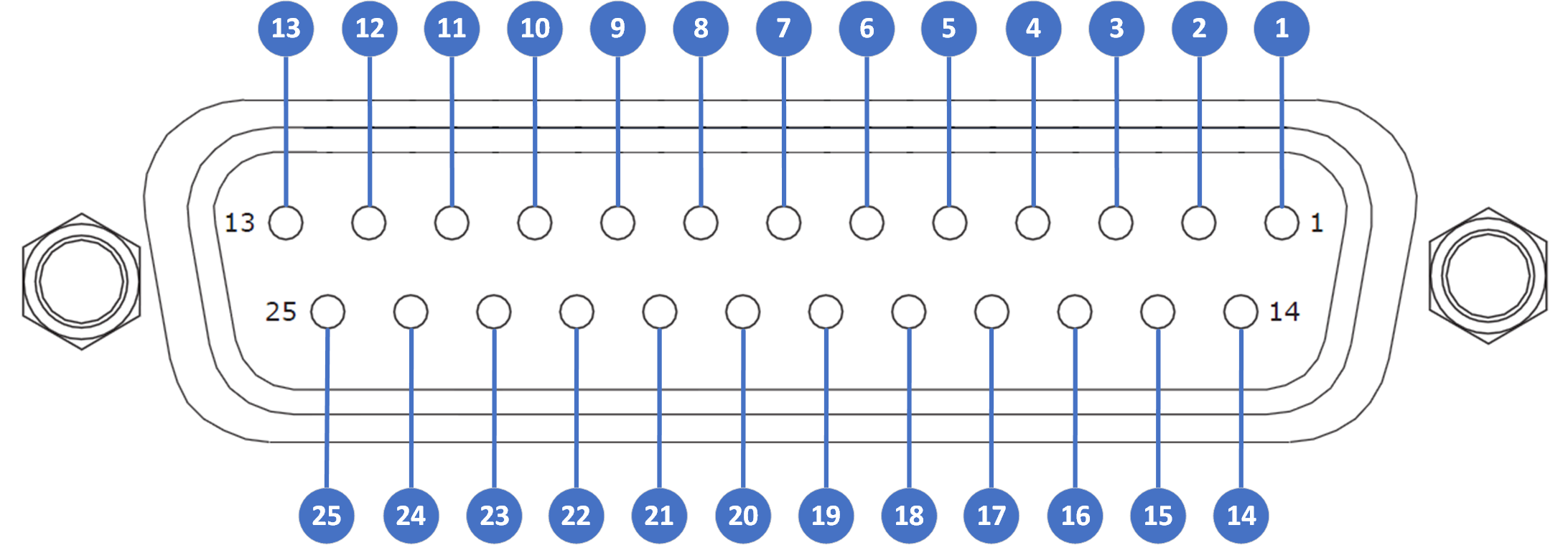
Female DB25
Codec Connector I/O 1-8
Pin |
Pin Function |
1 |
Output 1 |
2 |
Output 2 |
3 |
Output 3 |
4 |
Output 4 |
5 |
Output 5 |
6 |
Output 6 |
7 |
Output 7 |
8 |
Output 8 |
9 |
Input 1 |
10 |
Input 3 |
11 |
Input 5 |
12 |
Input 7 |
13 |
Ground |
14 |
Output 1 |
15 |
Output 2 |
16 |
Output 3 |
17 |
Output 4 |
18 |
Output 5 |
19 |
Output 6 |
20 |
Output 7 |
21 |
Output 8 |
22 |
Input 2 |
23 |
Input 4 |
24 |
Input 6 |
25 |
Input 8 |
|
Important Note: For more information about how to program relay operations with a PC using the Toolbox Web-GUI, please see Creating Rules. |

Control Port Pin-outs 9-16 (Gateway 8/16 Only)
A closing contact across Inputs 9-16 to Ground will provide a closing contact on remote codec Outputs 9 to 16.
Female DB25
Codec Connector I/O 9-16
Pin |
Pin Function |
1 |
Output 9 |
2 |
Output 10 |
3 |
Output 11 |
4 |
Output 12 |
5 |
Output 13 |
6 |
Output 14 |
7 |
Output 15 |
8 |
Output 16 |
9 |
Input 9 |
10 |
Input 11 |
11 |
Input 13 |
12 |
Input 15 |
13 |
Ground |
14 |
Output 9 |
15 |
Output 10 |
16 |
Output 11 |
17 |
Output 12 |
18 |
Output 13 |
19 |
Output 14 |
20 |
Output 15 |
21 |
Output 16 |
22 |
Input 10 |
23 |
Input 12 |
24 |
Input 14 |
25 |
Input 16 |
RS232 Pin-outs and Data Connections
Pin |
INTERFACE Female DB9 (RS232) DCE |
DATA Male DB9 (RS232) DTE |
1 |
No Connection |
No connection |
2 |
TX Data |
RX Data |
3 |
RX Data |
TX Data |
4 |
No connection |
No connection |
5 |
Signal Ground |
Signal Ground |
6 |
No Connection |
No connection |
7 |
CTS |
RTS |
8 |
RTS |
CTS |
9 |
No connection |
No connection |
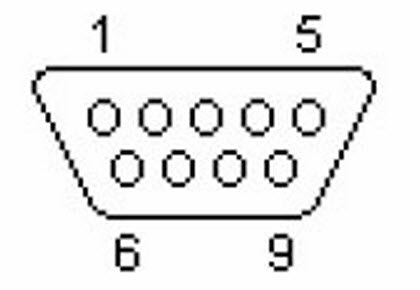 DB9 Male Connector Pins |
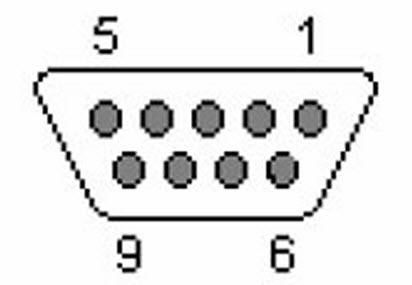 DB9 Female Connector Pins
|
|
Important Notes: •It is important that you enable serial port flow control within the codec. Flow control regulates the flow of data through the serial port. If disabled, data will flow unregulated and some may be lost. •Ensure you match the serial port baud rate to match the rate of the external device you are connecting to. Ideally the settings on both codecs should match, or you could have data overflow issues. •Only the dialing codec needs to be programmed to send RS232 data. Session data sent from the dialing codec will program all other compatible codecs (non-G3) when you connect. •RS232 data can be sent from the dialing codec to all endpoints of a multi-unicast or multicast audio stream if your codec is capable of these connections. Note: Bidirectional RS232 data is only available on the first connection dialed when multi-unicasting. |